

For bookkeepers · Mentorship, support & training
You have to do it yourself. You don’t have to do it alone.
1-on-1 help from Joana Linares, QuickBooks Online Advanced Certified ProAdvisor and founder of a virtual bookkeeping firm. Share your screen, talk it through and leave with the next step, one 60-minute session at a time.
- QuickBooks Online Advanced Certified ProAdvisor
- 7+ years of small business bookkeeping
- Hablamos español
- No courses to buy
Who calls the line
Bookkeepers at every stage, and the questions that come with it
Bookkeeping Helpline is for people who do the books. Fellow bookkeepers come for 1-on-1 guidance beyond the Q&A found on social media.
- Launch
Fresh from a course
You finished the course. Now you want hand-holding as you prepare for that first prospect or client.
- Launch
Going independent
You have bookkeeping and accounting experience and want to talk through offering services on your own.
- Launch
First client signed
You landed the client and you are not sure where or how to start. We map the first month together.
- Support
Stuck on a client file
Troubleshoot live on screen: reconciliations, bank feeds, point-of-sale sales, the account that will not tie out.
- Niche
Service-business specialists
Joana’s specialty is service-based businesses and QuickBooks Online. Bring the salon, clinic, studio or contractor file.
- Niche
Spanish-speaking bookkeepers
Joana is a fluent Spanish speaker. Talk through the work in the language you think in. Hablamos español.
- Niche
Military-spouse bookkeepers
A portable career that moves with every PCS. From one military spouse to another.
- Firms
Small firms training new hires
Give a new team member a mentor for QuickBooks Online workflows while you keep serving clients.
The Second Screen
Pick the spot you’re stuck on. See how an hour works through it.
Six questions bookkeepers bring to the line. Choose one and watch the shared screen: what Joana points to, in what order, and what to have open when you book.
- Dashboard
- Banking
- Sales
- Expenses
- Reports
- Settings
- POS gross sales $2,418.00 1
- Sales tax collected $199.49 2
- Tips collected $312.00 3
- Card processing fees −$71.12 4
- Deposit in the bank feed, next day $2,858.37 5
- Dashboard
- Banking
- Sales
- Expenses
- Reports
- Settings
- Checking ••4410 Reconciled Looks right
- Undeposited Funds $1,240.00 Not cleared 1
- Opening Balance Equity $3,415.27 Should be zero 2
- Equipment loan $18,200.00 Not tied to lender statement 3
- Payroll liabilities $642.18 Not tied to filings 4
- Dashboard
- Banking
- Sales
- Expenses
- Reports
- Settings
- Date typed as a shortcut 1020 → 10/20/2025 Lands in the new year 1
- Books being closed 2024 Looks right
- Entry on the 2024 report Missing Wrong year 2
- Closing date Not set 3
- Dashboard
- Banking
- Sales
- Expenses
- Reports
- Settings
- Close the books Off 1
- Accounting method Accrual Matches the client’s reporting? 2
- Bank rules 14 active · 3 auto-add 3
- Users with access 4 One former employee 4
- Sales tax On Looks right
- Dashboard
- Banking
- Sales
- Expenses
- Reports
- Settings
- Engagement letter Draft Not signed 1
- Accountant user invite Shared login instead 2
- Chart of accounts 112 accounts Template, not tailored 3
- Bank and card feeds Connected Looks right
- Opening balances Not entered 4
- Monthly close date Not on the calendar 5
- Dashboard
- Banking
- Sales
- Expenses
- Reports
- Settings
- Design contractor $8,400 W-9 on file
- Cleaning service LLC $2,150 W-9 missing 1
- Paid by credit card $1,900 Card payments 2
- Law firm, PC $1,200 Corporation 3
- Due date January 31 4
General workflow guidance for QuickBooks Online users, not tax or legal advice. Figures are an example.
Support · Training · Mentorship
Three ways to use your hour
Every session is 60 minutes, booked one at a time, to minimize overwhelm and keep it affordable. Prefer a visual, screen-shared walkthrough, or would you rather talk it through? Both work.
-
60 min
Support
A question on a live file. Share your screen, troubleshoot together and leave with the fix and the why behind it.
- Reconciliation that will not tie out
- Bank-feed rules and duplicates
- Point-of-sale daily or monthly sales
- Catch-up and clean-up decisions
-
60 min
Training
A personalized, visual, step-by-step workflow you can repeat on your own after the call.
- QuickBooks Online setup and settings
- Month-end close routine
- Sales tax and payroll entries
- Reports your clients actually read
-
60 min
Mentorship
The business side of bookkeeping, talked through with someone who runs a firm.
- Preparing for your first prospect
- Starting your practice independently
- Onboarding your first client
- Scope, boundaries and next steps
How it works
Complete the intake form
Tell us about you, your question and the kind of session you need.
Sign and submit
The intake form is signed electronically, so expectations are clear before anything is scheduled.
Get your reply
Bookkeeping Helpline reviews it and returns the countersigned form with a scheduling link, or a notice of declined services with an explanation.
Monthly plans & packages
Keep a standing hour, not a stack of saved-up questions
Start with a single session. When the questions keep coming, move to a monthly plan or a package built around where your practice is headed.
-
Pay as you go
Single session
One 60-minute support, training or mentorship session.
- Intake form first
- Screen-share by video
- Recap of next steps
Pricing shared after your intake
Book a session -
The everyday plan
Monthly
On-Call monthly
A standing hour every month plus a question queue between calls.
- 1 session a month
- Send questions ahead of time
- Month-end check-in
Pricing shared after your intake
Book a session -
Monthly
Practice Partner
For working bookkeepers growing a book of clients.
- 2 sessions a month
- One client file reviewed together
- Pricing and scope talk-throughs
Pricing shared after your intake
Book a session -
First 90 days
Launch Pack
From course certificate or first signed client to a repeatable month.
- 4 sessions over 90 days
- Setup, onboarding and first close
- Your own close checklist
Pricing shared after your intake
Book a session -
Monthly
Firm seats
Mentorship for a small firm’s new or junior bookkeepers.
- Sessions per seat
- Your workflows, taught your way
- Owner recap after each month
Pricing shared after your intake
Book a session -
Nov–Feb
Year-end & 1099 line
Extra help through year-end close, W-9 chasing and January 1099s.
- Year-end close review
- 1099 vendor clean-up
- February 1 debrief
Pricing shared after your intake
Book a session
The Call Plan
Map your sessions before you book the first one
Tell us where you are and what is on your list. You get a call-by-call plan with practice between calls and the format that fits.
Your call plan
3 calls · Launch Pack
Call 160 min
QuickBooks Online setup · Reconciliations · Engagement letters
Between calls: Reconcile one month alone and note what does not tie
Call 260 min
Client onboarding
Between calls: List the access you need from a new client
Best fit
Launch Pack: 4 sessions over your first 90 days
Setup, onboarding and your first close, with practice between calls.
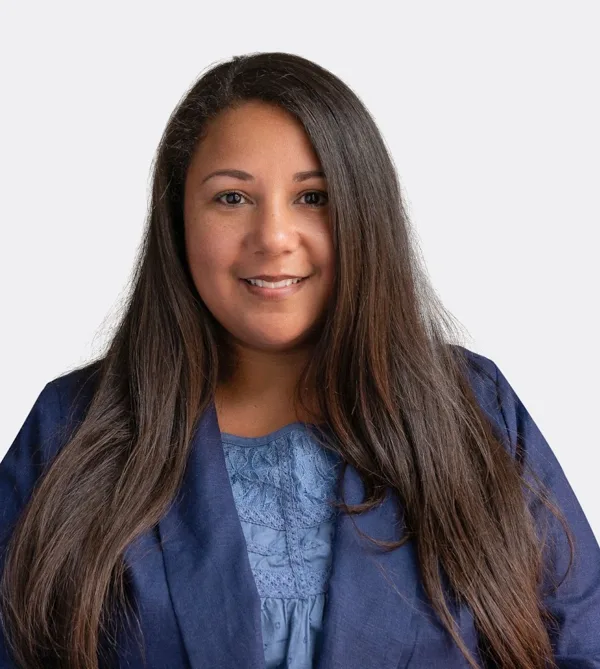
Meet Joana
¡Hola! My name is Joana.
I created Bookkeeping Helpline for fellow bookkeepers seeking 1-on-1 guidance and support (paid mentorship) beyond the type of Q&A often found in popular social media platforms.
All sessions are available in 60-minute increments in an effort to minimize overwhelm and offer an affordable option. My specialty is working with service-based businesses and technical knowledge of QuickBooks Online (QBO). The bookkeeping field is filled with collaborative professionals, and it’s fulfilling to both seek and provide mentorship.
- QuickBooks OnlineAdvanced Certified ProAdvisor
- 7+ yearssmall business bookkeeping
- 10+ yearscorporate accounting support
- Associate degreein accounting
- Founder
- Enumerista, a virtual bookkeeping firm, since 2019
- Specialty
- Service-based businesses and QuickBooks Online
- Languages
- English and Spanish
- Home
- New York City, then the military-spouse road (Go Army!), now Central Texas
Military-spouse owned and operatedProud Latina heritage · Hablamos españolCredentials on LinkedIn
Notes from the line
Collaboration over competition
The bookkeeping community is very supportive of one another. A few of the quick tips Joana shares with fellow bookkeepers on Instagram.
-
Close every balance sheet account
Bookkeepers: Are you reconciling or at least verifying the accuracy of every Balance Sheet account? If you are not doing so, then you aren’t really closing the books.
@bookkeepinghelpline · Feb 3, 2025
-
Review your settings monthly
Best Practice: Review QuickBooks Online settings at least once a month.
@bookkeepinghelpline · Nov 1, 2026
-
The date-shortcut year trap
If you type in 1020 into a date field in QuickBooks Online and tab or click out of it, this completes the field with the forward slashes + CURRENT year = 10/20/2025.
@bookkeepinghelpline · Jan 1, 2025
-
January is 1099 season
January / 1099 life hack for Bookkeepers / Accountants. We could’ve started back in Nov/Dec.
@bookkeepinghelpline · Jan 8, 2025
Also heard on the recorded live of the Bookkeeping Side Hustle channel on YouTube. Follow @bookkeepinghelpline
Recommendations
“Joana takes the time to not only teach…”
I found Joana through word of mouth. I could not have found her at a better time (other than when I first had the idea of opening a small business). First, you will not find another bookkeeper that will TEACH you how to clean up your own books. READ THAT AGAIN! Talk about a game changer. Second, you will feel competent in bookkeeping lingo, how to have clean books, and to run your business to its fullest capacity. Joana, takes the time to not only teach but allow you to ‘learn by doing.’ Finally, stop looking for someone and go with Joana. P.S. I have created plans for the moment my business surpasses a specific amount of sales, I will be using Joana as my full time bookkeeper.
I’ve have known Joana for almost two years. I’ve haven’t met a more energetic and thoughtful bookkeeper with all of the business contacts that I’ve come across. As she told me once, she doesn’t even hand out a business card unless she’s specifically asked for it because she genuinely wants to get to know a client, their needs, and offer help when it’s the appropriate time.
Sample · swap in a real note from a bookkeeper you’ve mentored
A short note from a bookkeeper after a Helpline session: the question they brought, what changed in their practice, and how many sessions it took.
For bookkeepers
Bookkeeping Helpline
Mentorship, support and training for the people who do the books.
Book a sessionTwo services, one founder
Bookkeeping Helpline services are provided by Enumerista LLC.
For business owners
Enumerista
Virtual DIY and done-for-you bookkeeping for service-based small businesses, in English or Spanish.
Visit EnumeristaQuestions bookkeepers ask
Before you call the line
What is Bookkeeping Helpline?
Bookkeeping Helpline is 1-on-1 paid mentorship, support and training for bookkeepers, led by Joana Linares, a QuickBooks Online Advanced Certified ProAdvisor. It goes beyond the Q&A found on social media: you get a private, screen-shared 60-minute session about your work.
Who is it for?
Bookkeepers: people who just finished a course, experienced bookkeepers going independent, bookkeepers with a first client, working bookkeepers stuck on a client file, and small firms training new team members. Business owners looking for a bookkeeper are better served by our sister firm, Enumerista.
How long is a session?
Sessions are 60 minutes and are booked one at a time, in 60-minute increments, to minimize overwhelm and keep the option affordable.
How do I get started?
Complete the intake form, sign and submit it, and Bookkeeping Helpline returns it countersigned with a scheduling link, or with a notice of declined services and an explanation.
Do you sell courses?
No. Bookkeeping Helpline does not sell courses. It is personal guidance on your own questions, files and practice.
Which software do you cover?
QuickBooks Online is Joana’s technical specialty, along with recording point-of-sale sales in a client’s books.
Can I get help in Spanish?
Yes. Joana is a fluent Spanish speaker. Sí, hablamos español.
Is there a refund if a session is completed?
Refunds are not provided once a training or support session has been purchased or completed. If a session did not meet your expectations, contact info@bookkeepinghelpline.com. Cancellation terms are in the agreement you sign before scheduling.
The line is open
Bring the question you’ve been sitting on.
One hour, your screen, a bookkeeper who has been there. Start with the intake form or book your first session.